
Otter Transcribe Voice Notes

Otter Transcribe Voice Notes

By Otter.ai, Inc.

  • Category: Productivity
  • Release Date: 2018-02-17
  • Current Version: 3.101.0
  • Adult Rating: 4+
  • File Size: 234.33 MB
  • Developer: Otter.ai, Inc.
  • Compatibility: Requires iOS 16.0 or later.
Score: 4.73526
4.73526
From 54,634 Ratings

Description

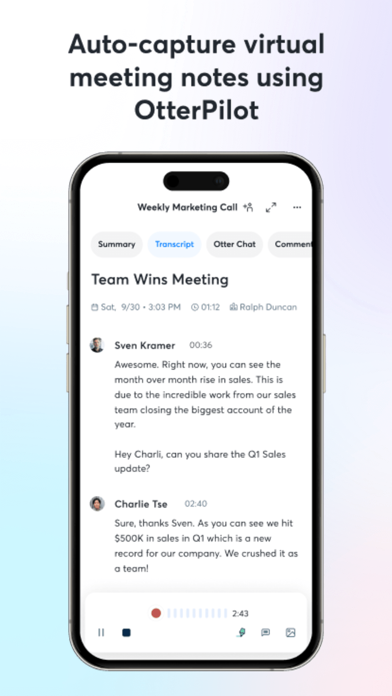
Never take meeting notes again. Otter AI is the fastest way to transcribe voice in real time. Get a meeting assistant that records audio, writes notes, automatically captures slides, and generates summaries. Available in English, Spanish, French and Japanese. Otter AI is also available on the web. Start for free. Trusted by over 10 million people and featured by Apple as "App of the Day" and "Editors' Choice." Automated meeting notes for Zoom, Google Meet, Microsoft Teams, and more. Stay connected and collaborative when you work from home. Otter transcribes all your meetings, interviews, lectures, and everyday voice conversations in real time, so you can focus on the discussion. KEY FEATURES • AI Meeting Assistant: get automated meeting notes & summaries • AI Chat: get answers and generate content • AI Channels: combine live conversations with async updates. Chat with teammates. • Record & transcribe live • Automated meeting notes & summaries • Share & collaborate • All notes are searchable & shareable • Edit & highlight • Organize & export • Import & sync Looking for a specific feature? Here are the details: RECORD & TRANSCRIBE LIVE • Instantly record in one tap • Transcribe in real time • Highlight key points to review later • Insert photos of whiteboard discussions, slides, etc. • Input audio via built-in mic or Bluetooth device ENRICH NOTES WITH AI • Gather information across all your conversations • Ask questions about a specific meeting • Generate follow- up emails • Automated Slide Capture during virtual meetings • Generate summary, outline and keywords after all meetings • Punctuate, capitalize, and break paragraphs automatically SHARE & COLLABORATE • Invite group members to view, edit, and highlight collaboratively • Add comments and assign action items • Share links externally SEARCH & PLAYBACK • Search the text so you don't have to scrub through the whole audio • Playback at adjustable speeds • Follow along the highlighted word as the audio is playing • Tap on any word to jump the audio to that spot EDIT & HIGHLIGHT • Edit the text to correct any errors • Tag the speakers to label the paragraphs and train Otter to identify speakers too • Highlight sentences in one tap IMPORT & SYNC • Import audio and video files • Upload from other call recording apps • Sync your calendars to be reminded to record your meetings and auto-title your notes • Import your contacts for easy sharing OPTIMIZED FOR iOS • Start/Stop recording with Siri Shortcut & home widget • Record via AirPods • Sync with iOS Calendar, Contacts & Camera Otter Pro Get more playback speeds, skip silence, and bulk export. Payment will be charged to your iTunes Account at confirmation of purchase. Subscription automatically renews unless auto-renew is turned off at least 24-hours before the end of the current period. Account will be charged for renewal within 24-hours prior to the end of the current period. You can manage your subscriptions in Settings and auto-renewal may be turned off by going to your Account Settings after purchase. Any unused portion of a free trial period, if offered, will be forfeited when you purchase a subscription. Need help? Check out our Help Center: https://help.otter.ai Terms of Service: https://otter.ai/terms-of-service Privacy Policy: https://otter.ai/privacy-policy

Screenshots

Reviews

  • Corporate saddie turned corporate baddie

    5
    By Arie琪
    This app changed me and my corporate life. Full stop.
  • This app is saving my writing career

    5
    By TrimGal
    As an increasingly disabled writer, that can no longer do the hours I 8sed to soend sitting at a desktop workstation—Otter fixed it, because reaching for my iPad with sleepy brain eyes and clicking record, mumbling through my new material take the amount of effort ever. And when they turn the authors author AI assistant on to be able to see across everything I’ve ever dictated, the clouds parted in the sun shone down I have something like 10,000+ miles and with some careful naming Oregon find everything I’ve ever dictated about a particular book or project. I don’t let author write for me that’s my job but I did try letting water find the story idea or two that I had work done about otter fog had more potential than the others. So while water AI assistant isn’t getting used as much for anything else like the heavy lifting that ChatGPT does for research, and the heavy research Gemini does finding me submission opportunities—Otter is the only one that knows the full scope of my creative life and also my journal. Journaling with Otter is an experience all into itself: the after conversation summary since Otter still is sort of a business model is really fascinating. I especially am amused and sometimes inspired by the action list. Not as a therapist mind you none of them should be your therapist, but it does tidy up your brain a bit after a long rant. Otter still is the best for recognizing human speech over background noise and Otter unlike other apps or just hitting the microphone while you’re working on an iPad, won’t hang up on you.You keep talking, and Otter keeps transcribing in the background.I’ve had to get some legal backup to convince places like my HOA board to allow me to record and transcribe, the part I spoke during meeting, my comments, so it’s turned quickly into an email follow up. So thank you Otter and thank you Otter development team. Five stars. No I’m gonna give you four stars because I want the team to keep chasing big dreams.
  • Capturing Importantance

    3
    By SonOfDod70
    Otter is the best at capturing words of importance.
  • Best note taking app

    5
    By FPiyet
    Helpful assistant in my meetings
  • In love with

    5
    By Miguelguau
    Best decision ever
  • Alerts are obtrusive

    3
    By Jsphanson
    Better but the alerts keep throwing me off, I use this for songwriting and the stupid alert when I am thinking makes it harder to concentrate. Can’t you just have the volume signifier that goes flat when it is quiet? Why do you have to have this huge blue popup to distract me? Then I start adding it to the lyrics unconsciously and forget what I was actually trying to write. I imagine that is also annoying in other situations.
  • Otter for Book Writing and Coaching

    5
    By AuthorCoach21
    Otter has become a go to tool for helping me and my clients. Write their books and get them produced. Not only do I use the Zoom summary feature which gives me a nice recap and checklist, but Otter allows me to give that real time deep work analysis and Chris capturing of articulated ideas that stand out above any other ideas. I wish there is a way to edit the transcript a little bit easier, I still have difficulty doing that. But for what Otter does, how it helps me write my works, as well as how it helps me work with other non-fiction authors to get their work into the world, it takes the Stream of consciousness and allows it to be captured as it flows out and then I get to go shape it after using some other type of word editing application. Highly recommend using Otter. Chris Trammell TheAuthorLaunchpad.com
  • Best dictation app out there

    5
    By Castaway195
    Only have the free version, but so good plan to upgrade in the near future. Quite Accurate And has a great summary feature. I use it for real life subtitles
  • neurodivergent creative producer always on the go

    5
    By i__mc2
    sometimes the best way for me to move any of my work forward is to lower my barrier of resistance and actually articulate my stream of consciousness into otter and have it summarize (and sometimes make sense of) my gibberish into something I can circulate to my team. it also helps me keep track of creative meetings, project reviews and every other oratory project needs I have. cannot recommend enough and will forever use.
  • Accurate and super easy to use and send a transcript

    5
    By JClarke4343
    Minimal friction from setup finished transcript

keyboard_arrow_up