Command App

Command App

By GSM Outdoors

  • Category: Photo & Video
  • Release Date: 2020-03-25
  • Current Version: 6.5.11
  • Adult Rating: 17+
  • File Size: 256.87 MB
  • Developer: GSM Outdoors
  • Compatibility: Requires iOS 15.0 or later.
Score: 4.58812
4.58812
From 59,368 Ratings

Description

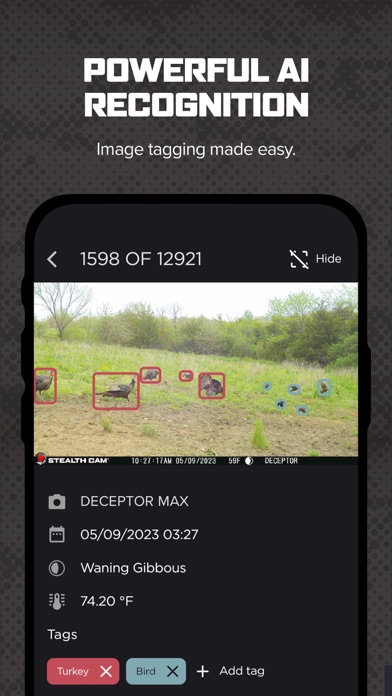
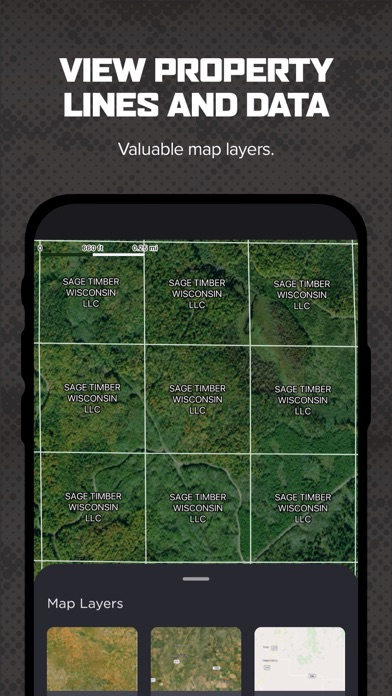
Manage your Stealth Cam and Muddy cellular trail cameras with Command. View, share, analyze, and configure your trail cameras with ease. Combine AI subject recognition with weather and solunar data to spot patterns and game movement like never before. Request near-instant high-definition photos and videos from your camera with On-Demand, or activate Live View for a real-time streaming experience with high-definition video and audio on compatible cameras. Experience the new features of Command with support for the Revolver and Revolver Pro 360-degree cellular trail cameras, including panoramic 360 and 180 photo review directly within the app. Enjoy advanced mapping capabilities with new maps such as property lines and hunting land maps, enhancing your scouting and planning efforts like never before. Command is your go-to tool for the ultimate scouting and hunting experience. ► COMMAND Features ► ◆ Quick camera setup and activation through Command ◆ Access and monitor all your Stealth Cam and Muddy cellular trail cameras ◆ Manage your cellular data plans and billing in the app ◆ View panoramic 360 and 180-degree images from new Revolver series cameras ◆ Request On-Demand HD photos and videos with the press of a button ◆ Activate Live View with real-time HD video and audio streaming on compatible cameras ◆ AI-driven or manual tagging of images ◆ Download, review, save, and share high-definition photos and videos ◆ Advanced mapping layers with the ability to manage cameras and settings from the mapping screen ◆ Set transmission times: instant, instant group, hourly, twice or once a day ◆ Create camera groups for enhanced organization and filtering ◆ Share view-only access to your cameras with other Command users ◆ Advanced filtering of images by AI tags, weather, solunar, and time of day ◆ Night-time colorization for IR flash photos ◆ Receive push notifications for new photos ◆ Integrate with HuntStand and DeerCast hunting apps ► Getting Started with COMMAND ► 1. Download Command to your device 2. Create an account, or login if you have an account 3. Add a camera by pressing the “+” button in the top right corner 4. Scan the QR code inside your camera and follow the instructions 5. Upon successful connection, your camera is ready to deploy

Screenshots

Reviews

  • Disappointed

    1
    By surfNewport
    Update May 31, 2026: saw the message from the developer, emailed (again) as they suggested, and still no response. 😭 — My trail cam never seemed fast enough to capture anything. Images were usually empty. I reached out to customer support when the live feed stopped working and had yet to get a response after several attempts. Meanwhile, it’s been about 3 months and I’m unable to cancel my monthly plan. It hasn’t been a perfect experience and now I’m left with all this hardware and a monthly subscription I can’t cancel from the app.
  • Slow and Color Option

    1
    By Leeggggghdhshsh
    Since the last update the app is so slow loading pics. I’ve tried on different networks and my cell network. All are slow as heck. It used to be a lot faster but now it’s terrible… Also, they removed the option to show colored night time pics when reviewing all the pics. You use be able to have color on all the pics when previewing. Now you have to go into pic to see night time pics in color.
  • Joe

    5
    By Locked an loaded
    Love the cameras but wished tec support was easier
  • Worth it

    5
    By Nicthagoat
    I really couldn’t say anything bad about my camper from its sensitivity to its picture quality all around good investment
  • Good picture

    3
    By bearpawb4 u
    Takes a good picture but the memory card won’t format.
  • Camera

    1
    By GlennK215
    Ap is fine. Both cameras will not stop snapping pictures about every 4 minutes. Have it set to be on a couple hours per day. Emailed with no reply. Paid for year of service in advance so letting it snap away
  • Good cam

    4
    By Feralforager
    It seems as tho my sensitivity won’t go down low enough anymore causing me to have to buy a bigger plan. Other than that I’m happy with it
  • really good

    5
    By jeteue
    Its great for your hunting land or just for a camera but issue is it says it takes a picture and it doesnt but overall its good!!!
  • Outdoor camera

    2
    By Ask us F guu u tv g
    I have had better cameras that cost less.
  • Plan

    1
    By Ash24052
    You have to pay monthly but only get a yearly number of photos

keyboard_arrow_up