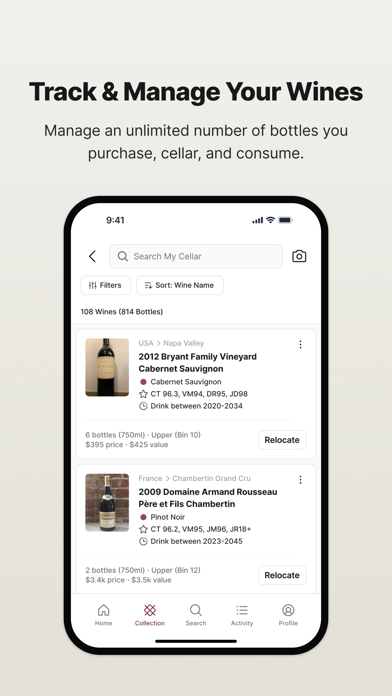
CellarTracker is the top-rated wine app with 4.9 of 5 stars, over 13.6 million wine ratings and reviews, and over 8.8 million users globally, collectively tracking $21 billion of wine and millions of personal memories captured over the last 20 years. CellarTracker is the most current, accurate, and comprehensive wine database globally with over 5 million unique wines to explore, 1000 + new wines added each day, and over 193 million bottles tracked by members. Featured in leading publications globally including the New York Times, Guardian, Wall Street Journal, CNBC, Robb Report, CNN, Financial Times, Decanter, Fox Business and more. CellarTracker empowers millions of people around the world to discover and experience wines they love. If you’ve ever wondered what wine to pick from a restaurant wine list, have a small collection at home, or are a long-time wine enthusiast with a $10 million cellar, CellarTracker is the best wine cellar management app and wine tracker hands down. We completely modernized the CellarTracker experience and our new wine app was released last year – we have carefully built AI into the product over the last two years, powered by over 20 years of tasting notes and wine rating data that is unparalleled in the industry. TRACK YOUR WINE EXPERIENCE The best wine app and wine cellar tracker for casual drinkers, collectors, and connoisseurs alike. CellarTracker is the go-to wine app for wine ratings. - Add personal wine tasting notes, reviews, and wine ratings for each bottle - Access over 13M wine reviews: 11M community tasting notes + 2M professional reviews - Use the wine scanner or barcode tool to log bottles in seconds KNOW A FAIR PRICE TO PAY Make smarter purchases with real-time price transparency using the wine cellar application and wine inventory software trusted by serious collectors. - View 15+ years of valuation data and values based on over 80+ million data points - Access auction data and average Wine-Searcher prices from 37,000+ merchants and compare 20M+ listings: retail, auction, and more CHOOSE THE BEST BOTTLE OF WINE The best wine tracking app to help you open the perfect bottle at the perfect time—based on your collection, taste, and timing. - Get personalized wine recommendations from your ratings - Stay alert on bottles ready to drink vs. those needing more time - Compare community tasting notes, wine reviews, wine ratings, and your notes EFFORTLESSLY MANAGE YOUR CELLAR The most intuitive wine tracker and wine scanner for organizing your collection—without complexity or cost. - Add wines via wine scanner, barcode, label scan, or digital receipt forwarding - Track storage locations and pending deliveries - Manage wine inventory collections across multiple storage sites - Monitor cellar value and consumption trends DISCOVER NEW WINES & PRODUCERS Use our wine cellar tracker and wine rating app to explore top wines and trending producers from the global wine community. - Get tailored wine suggestions based on your preferences - Use the wine scanner to see what others are drinking and loving THE MOST ACCURATE WINE DATABASE CellarTracker’s community-powered platform delivers unmatched coverage and accuracy and is well established as the best wine reviews app and wine tracker. - Search from 5M+ unique wines with 1000+ new wines added daily - Rich data on producers, regions, vintages, and varietals SEAMLESS WINE-SEARCHER INTEGRATION A powerful feature of our cellar tracker app and wine tracker, Wine-Searcher integration ensures real-time market intelligence. - Instantly view and compare prices from 37,000+ global merchants - Access over 20M offers across retail and auctions SMARTER WINE DECISIONS WITH THE BEST AI WINE APP The only AI wine app and cellar tracker powered by over 13M+ tasting notes, reviews, and ratings - Get recommendations on whether you’ll like a wine based on your unique taste - Get expert-grade food pairing recommendations