
Picasso App Screenshot Studio

Picasso App Screenshot Studio

By ASO Ventures LLC

  • Category: Developer Tools
  • Release Date: 2023-12-24
  • Current Version: 3.5.1
  • Adult Rating: 4+
  • File Size: 164.16 MB
  • Developer: ASO Ventures LLC
  • Compatibility: Requires iOS 17.6 or later.
Score: 4.18182
4.18182
From 44 Ratings

Description

Take the headache out of generating app screenshots! 60% of users decide whether to download your app based on the screenshots. With Picasso, you can showcase your app to its fullest and increase your conversion rate. Available for iPhone, iPad, and Mac, Picasso offers everything you need to make your app stand out! ** Simple Interface ** Picasso has been optimized for Apple's platforms, taking advantage of everything your device has to offer. And with iCloud, you can edit a document on one device, and seamlessly pick it up on another. ** Device Framing ** Support for over framing 40 devices, including iPhones, iPads, Macs, and Apple Watches. Screenshots are automatically wrapped in the appropriate device frame down to the last pixel. You won't find a better app to frame your screenshots. ** Drag-and-Drop Editor ** Full drag and drop support helps streamline the editing process. ** Templates ** Choose from several templates to hit the ground running! No design skills needed. ** Easy Export ** Picasso makes exporting easy by giving you a preview of your screenshots, as well as automatic naming and ordering, making it a cinch to upload to the App Store. ** Accurate Previews ** See exactly how your screenshots will appear in the App Store, cutting out unnecessary iteration and toil. ** Power Features ** Keyboard shortcuts make navigating the app fast. -- Picasso Pro Features (In-App Purchase required) -- ** Upload Directly to App Store Connect ** Once an app is linked with an App Store Connect API Key, you can upload your screenshots directly to App Store Connect. ** Localization Support ** Simply drag an .xcstrings file into Picasso to localize your screenshots for any language! ** Add Images to Screenshots ** The ability to add any image to a screenshot. ** Gradients and Blurs ** Use captivating gradients and blurs to style your screenshots. ** Span Items across Screenshots ** Span items across multiple screenshots, and Picasso will make sure the spacing is correct. Terms of Service: https://getpicasso.com/terms Privacy Policy: https://getpicasso.com/privacy

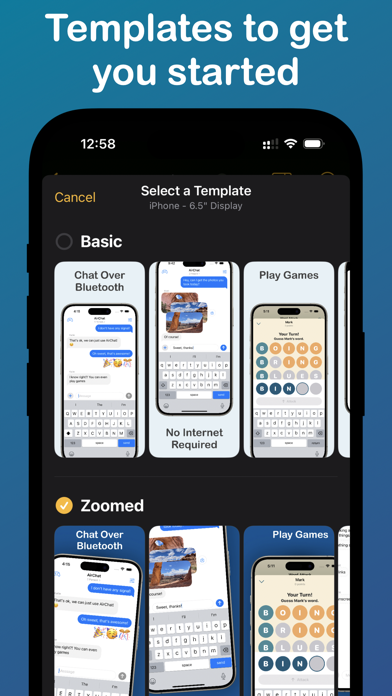
Screenshots

Reviews

  • A screenshot app doesn’t need an account

    1
    By nrrh
    Didn’t even use the app, but it immediately asks for your email and there’s no way to see how the app would even work without doing so. Just garbage behavior that is completely unnecessary.
  • Buggy…

    4
    By -J-a-x-
    I really like this app in concept, the tools are good and localization features are a game changer. I used it to make all my app screenshots in 4 languages. Then I ran into bugs. The app originally exported perfectly, then after one update it exported weird distorted images, then after another update that was fixed but it exported the wrong sized, images, then that was fixed then there was an update that crashed on startup, the next update fixed it…. There definitely isn’t enough emphasis form the developer on quality control. I emailed the developer multiple times and only got a response to 1 of my emails after many months so support isn’t great either. With those caveats, I’ve gone back to using the app because the international features are actually useful. So before you buy, know that it’s maybe not the most reliable app ever, but when it works it is nice. If it wasn’t so buggy I’d buy lifetime in a heartbeat but as it is I never know if the next update will work properly or not…
  • Crashes all the time, can’t sign in

    2
    By Awesomekiwidude
    When it works it’s fine but at the moment opening the app on iPad crashes immediately, reinstalling did not help. I’ve for months now been unable to log in on Mac as well (I don’t remember but I think it never sent me an email link to log in, or it did and clicking it opened the app and did nothing). So I’m giving up on this app because I obviously need a production-ready app for screenshots.
  • Huge Time Saver

    5
    By generallycontent
    For independent developers looking to not waste time on the administrative parts of listing on the App Store, this has been a huge, huge help. Instead of bouncing around trying to learn Figma, Sketch, and Affinity, this did exactly what I wanted.
  • Collects emails

    2
    By A. Fig Lee
    Start app by asking for email is a very bad idea, I even did not see interface yet, do not know what is the app and would I need it or not. Yet, author already wants valid email. Ok, I will block it later. Regardless of the features, this itself does not worth more than 2 stars
  • Useful!

    5
    By Dr. Goldfish
    Beginner-friendly, simple, and straightforward.
  • Good idea, lacks execution

    2
    By Kms122103
    Designing in the app is super easy and intuitive. I am having lots of issues uploading. The app seems to be uploading blank transparent images instead of my screenshots and then complains that my Apple Store app already has 10 screenshots. Also the export feature is the wrong amount of pixels!
  • Meh

    2
    By WokaWokaWoka
    Functional, but horrendously slow. No undo when editing screens until you close the editor window. Poor type support: Forget about making a word bold or italic. No kerning support, so letters run together awkwardly. No leading options. Did I mention it was sloooooooooooow? Running it on M1 Max. FFS, “White” in the color picker is #FEFEFE !!! Good luck!
  • Nice but not Deep

    4
    By lemmonlad
    There were some bugs and we need way more templates.
  • Major bug blocks all progress

    1
    By Vandelay, Art
    The app seems great. Very easy to add screenshots, text and images. However, when I try to export my work into screenshots for App Store submission, I only get a bunch of black screens. No matter what I do, I can’t generate any screenshots. So effectively, this means the app doesn’t work. I hope the dev looks into this asap. I’ll update my review once the bug is fixed.

keyboard_arrow_up