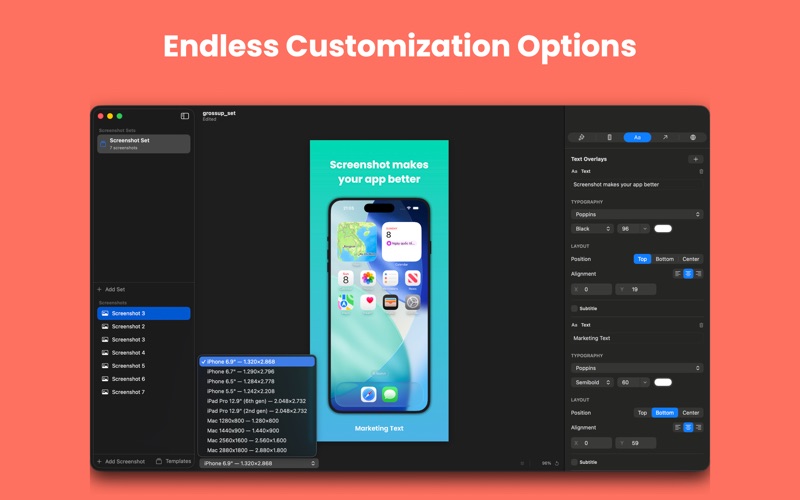
Snapsmith is a native macOS app that helps indie developers and small teams create professional App Store screenshots — without Figma, Sketch, or Photoshop. DESIGN BEAUTIFUL SCREENSHOTS Drop in your app screenshots and instantly frame them with realistic device bezels. Choose from 11 device models including iPhone 16 Pro Max, iPad Pro, and more. Add stunning gradient, mesh, or image backgrounds with one click. POWERFUL TEXT & TYPOGRAPHY Add headlines and subtitles with full control over font, weight, size, color, and alignment. Choose from 200+ system fonts including SF Pro and New York. Position text above or below your device frame with pixel-perfect precision. ANNOTATIONS Highlight features with circles, rectangles, arrows, and callout badges. Customize colors, line widths, opacity, and rotation for each annotation. TEMPLATES Get started fast with 11 built-in templates across Minimal, Gradient, Bold, and iPad categories. Pick a template, drop in your screenshot, and customize to match your brand. MULTI-SIZE EXPORT Export to every App Store screenshot size at once — iPhone 6.9", 6.7", 6.5", 5.5", iPad Pro 12.9", and Mac. Organize exports by locale and size automatically. LOCALIZATION Create localized screenshots for 21+ languages. Manage translations per text overlay and export each locale separately. BUILT FOR MAC Snapsmith is a true native macOS app — fast, lightweight, and built with SwiftUI. Drag and drop images, use keyboard shortcuts, and enjoy full undo/redo support. Your projects save as .snapsmith files you can revisit anytime. FREE TO START Try Snapsmith for free with up to 4 screenshots, solid color backgrounds, and 10 exports. Unlock Snapsmith Pro with a one-time purchase for unlimited everything.