Japan Travel - Smart Transit

Japan Travel - Smart Transit

By NAVITIME JAPAN CO.,LTD.

  • Category: Navigation
  • Release Date: 2013-10-18
  • Current Version: 11.3.2
  • Adult Rating: 4+
  • File Size: 242.35 MB
  • Developer: NAVITIME JAPAN CO.,LTD.
  • Compatibility: Requires iOS 16.5 or later.
Score: 4.698
4.698
From 2,553 Ratings

Description

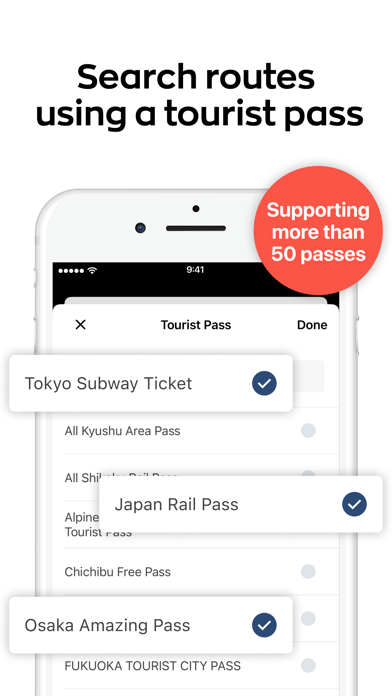
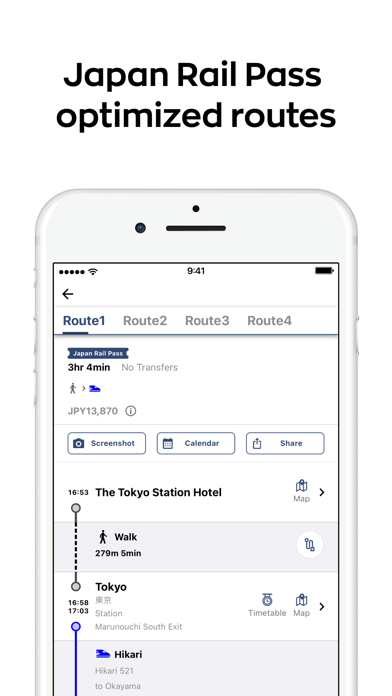
Japan Travel by NAVITIME will help you travel around like a local! App Overview: -Explore (Travel guides/articles) -Route Search -Map / Offline Spot Search -Plan About the Features: [Explore] -We provide you with basic guides and informative articles about traveling in Japan, written by foreign autohrs residing in Japan. -Topics include transportation, money, internet connection, food, art&culture, nightlife, shopping, etc. -Recommended itineraries are also provided for areas throughout the country. [Route Search] -The app navigates you from your preferred point of departure to your destination. -Search covers all modes of public transport (trains including JR and subway lines, airplanes, taxis, and ferries). -Provides useful information such as the platform number, station lists, and timetables. -Search directly from a zoomable interactive map of the Tokyo area. -Allows you to save up to 50 recently searched routes. You can also see them while offline. -The Japan Rail Pass mode will show the most efficient route for pass holders. [Map / Offline Spot Search] -Search offline for the following spots: Free Wi-Fi hotspots (NTT FREE Wi-Fi, FREESPOT, Starbucks, etc.), currency exchange spots, ATMs, TICs, and train stations. -Book hotels, rental cars, and activities nearby you or your destination. [Plan] -While reading articles or searching on the map, add spots to your favorites that sounds attractive. -Create your own travel plan with your favorite spots by adding them in a timeline. Your plan can be also viewed on a map. -Comfirm the transportation information directly from your plan. You can select modes of transportation like train, taxi, walking, local buses, etc. -Start your planning from our recommended itineraries, and coordinate it by adding spots from your interests. [Itinerary] (New!) - Search, create, and share travel itineraries. Search from +200 itineraries created by our Editorial Team, as well as by other users. [PAID Features] -Search alternative routes in case of a disruption to your searched route. -Voice navigation will show you directions and landmarks. -Check the rankings of articles to know the hot topics. -Make more collections and sort out your favorite spots. -Rain & snow radar will show the forecast up to 6 hours ahead. *Notice: -This app uses GPS in the background for the purpose of enhancing user experience. You can turn the GPS off from Settings on your device. -Continued use of GPS running in the background can dramatically decrease battery life. -At the time of your initial access, we ask users to participate in a survey for the Japan Tourism Agency, which is aimed to enhance tourism experience in Japan. This survey is optional, and you will be able to use the app without answering them.

Screenshots

Reviews

  • Avoid avoid avoid navitime

    1
    By ccckow
    No customer support, no desks in transit centers. Lost $200 to these folks. Best to work directly with Japan systems .
  • Great for finding routes

    5
    By Spencer77339
    Used for 3 week trip to Japan and found it extremely helpful for finding routes, especially when there are multiple lines needed.
  • Can be Useful but be careful

    3
    By Doug Bauder
    We used this app for 2 weeks in Japan. Be aware that the app is run by Navitime travel, a Japanese company that marks up its products through the app. For example if you buy bullet train tickets thru the app you will pay about a 10% premium. Further the app pushes Klook which also marks up. Here’s where the app is useful- for look ahead trip planning that involves multiple stages. Finally be aware that the search function in the app is not that good compared toggle maps
  • Still figuring out how to use

    3
    By Ora188
    This app is a good idea. Maybe it’s still being enhanced…there’s a lot of room to improve. Suggestions for searching routes: 1. Allow users to use the map to pin both start and end points. 2. When editing the start and end points, let the users to edit the locations already entered instead of typing the whole thing again. 3. Include the bus number in the route list. 4. The Map location of a subway station doesn’t pin point exactly to the station exit number…Google map works precisely on that. Features like timetables are nice to have, but you have to pay for the premium version…Google map has that already. Use Google Map for now.
  • Better App, that’s Free and offline.

    2
    By cren93
    As someone who’s traveled to Japan multiple times this app really doesn’t benefit the traveler, hidden costs, and just not that beneficial. There are other apps to use that can be offline. I found a website RailSensejapan.com that is a offline app. Super handy. Japan Travel can learn a thing or two from them.
  • Travel

    5
    By NOCTURNAL1313
    This was a life saver when we went to your beautiful country
  • ZERO

    1
    By Forp02
    Bought round trip tickets. I was charged $140. I went to use QR Code at station. It didn’t work. Many employees at the station tried to help. None of them could figure out the issue either. I asked for a refund. They only gave me back $20 at the counter. When I asked the counter, why I was only give $20 instead of the $140, they said they don’t know where the $140 charge came from. Mind you I’m showing them the receipt right in front of them. I don’t know if it is new management, but they seem absolutely clueless. I ended up losing $120 for no services provided.
  • Amazing

    5
    By cris-2fit
    Very reliable information!! Even an earthquake incoming will give notification; very helpful!!!
  • Use Google Maps instead

    1
    By Toddp27
    We paid for the seven day premium, and this was a waste of money. The GPS never worked, and Google Maps was much better and more accurate as far as telling you when to walk and when to take the subway or when you should take a taxi. Also, Google maps gives you step-by-step instructions, both written and GPS. Lastly, we purchased speed train tickets on this app and the day before they told us that we got bumped from the train and they refunded our money and at this point there were no more seats left so would definitely never use this app.
  • STAY AWAY

    1
    By Ar_gonza
    Huge scam. Massive markup for any tickets purchased through their platform. Better to purchase tickets directly from the train lines you are interested in riding. Customer service is also rude and difficult to contact. Absolutely would not recommend

keyboard_arrow_up