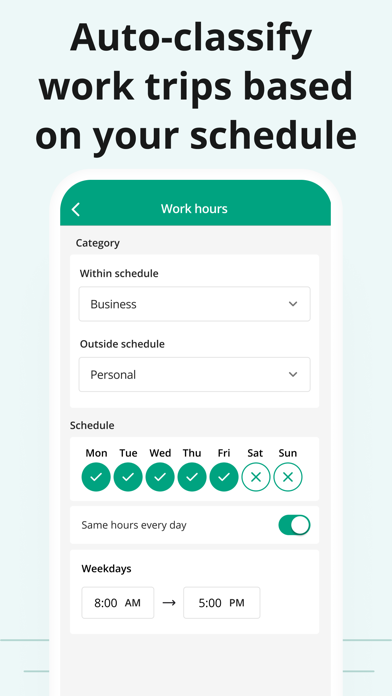
Say goodbye to tedious paper mileage logs with the most accurate automatic mileage tracker. Accurately track business mileage and create IRS-compliant logs at the touch of a button. With Driversnote, you get all the reimbursement or deductions you’re entitled to. Join millions of drivers and simplify miles tracking to just 3 steps: Track, Classify and Report! ◉ CLAIM YOUR TIME BACK Our mile tracker saves you hours of manually logging journeys. The app records all the information you need in real time. ◉ TAX TIME ISN’T A HEADACHE ANYMORE Effortlessly get tax-compliant mileage logs of your work-related driving for reporting to the IRS. ◉ BE THE MOST ORGANIZED EMPLOYEE Create and send your trip logs to your employer in a matter of seconds. ◉ TAX AUDIT COMING UP? Access your previous and current logs anytime, anywhere. ◉ WORLD-CLASS SUPPORT Simply send an email to our brilliant Support team with any questions and they’ll get back to you. The only mileage tracker you need as a business, sole trader, employee, employer, or just about anyone who drives! ► 1. TRACK ※ Track trips completely automatically - the car mile tracker will start tracking once you reach a certain speed. ※ Want to track an individual trip? Just tap START and STOP and leave the rest to our smart GPS automatic mile tracker. ※ Effortless odometer tracking. ※ Forgot to track travel during the day? Enter the start and end addresses of your drives and the app will do the rest for you. ► IBEACON: Further Improve Automatic Miles Tracking Place an iBeacon in your car and Driversnote will track only your preferred vehicle's miles every time you enter or leave your car. Get a free iBeacon when you sign up for the annual Pro subscription on our website. ► 2. CLASSIFY ※ Categorize each trip as Business, Personal, Medical or Charity for a compliant driving log ※ Set your working hours for automatic classification of trips as Business and Personal ※ Add notes to your recorded journeys ※ Review your trips at a glance and easily edit details ► 3. REPORT ※ IRS-compliant reports for your employee reimbursement or car expenses tax claim ※ Claiming deductions by the actual expenses method? Use the percentage split to report the percentage of miles you traveled for work ※ Create separate logs for separate vehicles and workplaces ※ Choose if you want to show odometer readings ※ Have your reports include the total miles, start and end dates, distance, reimbursement amount or % split between business and personal driving ※ Get your vehicle log books in PDF or Excel, or send them directly through the app ► DRIVERSNOTE FOR WEB: Bring All the Functionality to Your Desktop ※ Review your logs and edit details easily ※ Add trips you forgot to record ※ Generate your mileage reports ► KEEP ON TOP OF YOUR LOGBOOK ※ Customize your reimbursement rate if it’s different from the one the IRS sets ※ Set reporting reminders so you never forget to report your miles ※ Save addresses you visit often ► DRIVERSNOTE FOR TEAMS: Perfect for Business Reimbursement Programs ※ Invite and remove users ※ Employees use the automatic mileage tracker ※ Employees create & share consistent logbooks with their managers ※ Managers review and approve reimbursement expense claims in one simple overview ※ Privacy - managers can only see the trips employees report ► PRIVACY BY DESIGN ※ We never sell data ※ We will never provide your information to other parties for marketing purposes ※ See more in our Privacy Policy ► SUPPORT ※ Looking for a quick answer to your question? Visit our comprehensive Help Center straight from the app. ※ Our efficient and effective Support team is ready to assist you at any time at [email protected] ※ Privacy Policy: https://www.driversnote.com/privacy-policy ※ Terms of Service: https://www.driversnote.com/terms-of-service ※ Terms of Use (EULA): https://www.apple.com/legal/internet-services/itunes/dev/stdeula/