Pro Camera by Moment

Pro Camera by Moment

By Moment Inc.

  • Category: Photo & Video
  • Release Date: 2014-11-18
  • Current Version: 5.8.6
  • Adult Rating: 4+
  • File Size: 118.50 MB
  • Developer: Moment Inc.
  • Compatibility: Requires iOS 15.0 or later.
Score: 4.57552
4.57552
From 9,223 Ratings

Description

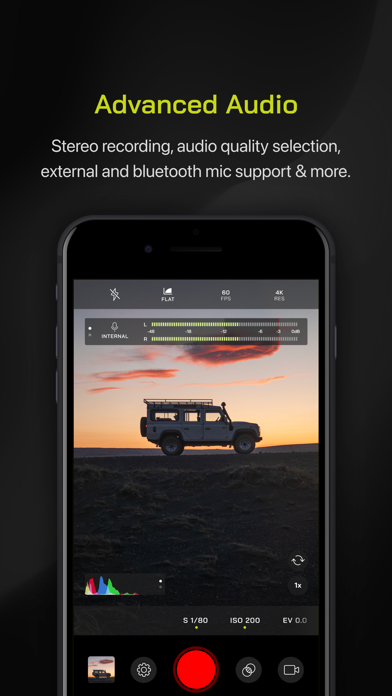
Pro Camera by Moment is the manual camera app that gives you full creative control and professional-level performance, all at an affordable price. It brings us closer to what we love about our DSLR and mirrorless cameras – exposure controls, precise focus, rich colors, smooth video, crisp audio – without being complicated. If you are looking for a powerful and easy-to-use camera app, Pro Camera is for you. We make it fast and intuitive to switch between modes, dial in your shot, and keep shooting. Plus, we give you all the manual controls you’ll need: shutter speed, ISO, white balance, focus, and more. Your favorite settings can be saved and recalled on demand. For filmmakers – the features you need, not the ones you don’t. LUTs, color spaces, bitrates, dual-channel audio meters, real-time waveforms, fast access to frame rates, and more. For photographers – easier than shooting on your DSLR. Shoot in RAW (even in bursts), capture brackets, and more. You can even create stunning timelapses and light trail effects (in-app purchase required). For everyone else – inspired by the pros we made the interface simple, fast, and easy to use. We provide getting started tips, video tutorials, and full-time customer service to get you set up. We love hearing from you. If you have any features, ideas, or feedback please email us at [email protected] or DM us on Instagram @moment. GENERAL FEATURES + Full manual: control shutter speed, iso, exposure, focus, and white balance with easy-to-use sliders + Focus peaking: manually dial in your focus using highlighted in-focus regions + Zebra stripes: quickly determine over- and under-exposed areas in the viewfinder + Split focus and exposure: take control of tricky lighting scenarios + Viewfinder grid: choose from thirds, square, and golden ratio + Gyroscope: ensure your shot is level with an on-screen gyroscope and haptic feedback PHOTOGRAPHY FEATURES + RAW and TIFF: shoot photos in RAW/ProRAW format for better editing, or TIFF for high-quality printing + RAW+JPG option: simultaneously get the best of both worlds + Burst mode: capture burst shots in RAW format – capture action while maintaining the uncompressed quality pros want with RAW + Bracketing: capture multiple exposures to stack later in your favorite editing apps FILMMAKER FEATURES + Import, organize, and use your favorite LUTs + Color spaces: choose between Rec.709, Rec.2020 HDR, Display P3, and Apple Log (on compatible devices) + Codecs: shoot in HEVC, H.264, or any of the 422 ProRes variants + Video bitrates: get precise control over video quality with standard, medium, and high bitrate options + RGB histogram: dial in your video color, balance, and exposure + Waveform monitor: evaluate video brightness and exposure across your shot in real time + Audio meters: get just the right sound levels with real-time, precise, dual-channel audio levels + HDMI clean feed output: preview on a bigger screen + Video stabilization: make your videos buttery smooth + Video formats: change your resolution and frame rate on screen, without digging into a settings menu + Anamorphic: use the Moment Anamorphic lens to shoot amazing, letterbox style photos and videos, with a de-squeeze option built in PREMIUM FEATURES (In-App Purchases) + Timelapse mode: capture stunning time-lapse videos + Slow Shutter mode: long exposure shots with motion blur or light trails WORKS WITH + iPhone 16 Camera Control: get quick access to manual settings + Lens control: manually control which of the triple/dual lenses you want to shoot with so you can use Moment lenses over each one + Moment lenses: access options like anamorphic de-squeeze and distortion correction + Moment battery case: works with the DSLR-like shutter button on our photography cases for half-press and full-press capture. Take better photos, faster. + Apple Watch: use your watch as a remote to shoot photos or record videos + Siri Shortcuts: quick access to capture a photo or start a video

Screenshots

Reviews

  • 一条请求信息

    5
    By 刘阿粮
    尊敬的朋友,请您给软件添加简体中文语言,十分感谢。
  • The ultimate blend of Power and Usability

    5
    By HansHR
    I LOVE this product!! I am currently COO of a mid sized consumer products company and have owned my own IT company in the past. In those roles and just as a consumer, I am constantly searching for apps that help me optimize the power of the amazing camera and computer in my pocket. I’ve also been a hard core prosumer videographer since the day video went digital for the mass market in the mid 90’s. This product NAILS what I’ve been looking for. Until the iphone 13 pro max, I often carried a separate HD video camera with me, but what a hassle. The 13 pro main lens became good enough, that I started to be “okay” with the trade-off of simply using my iphone nearly everywhere; using software from company Fil**c. The hardware on the 13 was amazing given the inherently small size of the sensors and optics. But the native camera app – while “Okay” in daylight outdoors – left much to be desired once in doors and especially at night (inadequate bitrate for the noisier source and a tendency to look way over-saturated, among other issues). Fil**c went a long way towards improving the quality via higher bit rates and more options, including the ability to adjust saturation and vibrance. That legacy product stopped getting upgraded and then went to a subscription. I have a 17 pro now and have tried EVERY major premium video shooting app for the iphone. To me the real challenge is finding an app that provides a lot of power and flexibility to maximize output quality WITHOUT getting something that is so cumbersome and complicated that it defeats the whole point of (reasonable) convenience and simplicity (let alone often resulting in products that seem to be less reliable and glitchy – more than once I’ve gotten home with some of these other apps and discovered something went wrong and rendered the footage useless). BTW, I don’t carry a keyboard in my pocket and I am not using external add on lenses – that’s a different user market than I’m in (though Moment is also great for that user). To me, MOMENT absolutely nails this tricky balance of great power and flexibility with good convenience and simplicity. And it is ROCK SOLID STABLE. No other product comes close. The ability to dial-in LUT strength and the full-feature profiles alone make this product a steal. And you can buy it ONE time – no subscriptions! Amazing value. Our entire marketing department and most of my extended family (those that shoot a lot of video) now use this product and rave about it. ALSO - very responsive customer support. Can’t recommend this product and company enough!
  • Not working

    1
    By No thanks 27
    App stopped working post iOS 26 update. Need this to work or I want a refund
  • Pretty cool but…

    4
    By zombieguy68
    Just got the app so far seems pretty cool but would be even cooler if a chat bought helped with some questions
  • Great app for photos and videos

    5
    By vVRaGEVv
    Well worth the money. Videos look crisp and photos look amazing. Love the fact that I can adjust focus and the quality is way better than the home camera on the phone.
  • Iphone 6s ios 15.8.6

    3
    By dektian
    Screen blank, camera view is fully black, unstable fo select feature in menu
  • Have a simple need

    3
    By Skippie of BVI
    The pop ups are awful…when I pay for software, I don’t expect to be flooded with pop ups. I have a simple need to take a photo which focuses on a subject with a window screen between my phone and the subject. How do I do that? .
  • Bought this and then they release v2 with new features

    1
    By Wgdbsksn
    Why cant you just add features to this app like the normal processing?
  • The app is good, but the pre-order for Pro Camera II wasn’t.

    3
    By mj_645
    This app is well worth the $9 plus tax I spent on it. I have an iPhone 17 Pro and being able to fully take advantage of the camera system has been tremendous for me. However, the handling of the pre-order for Pro Camera II leaves much to be desired. I did not receive the advertised discount for the second edition of this app, leaving me to pay the full cost again, and I am very disappointed.
  • Shutter Speed locked in at 48!!

    3
    By Shortycute
    please allow my shutter to STAND STILL I put it at “s 1/48” and it freaking moves down!! to 39 that’s so INCONVENIENT and UNNECESSARY and wastes my time and energy please allow me to lock it in at least it moves and feature could be better after that I’m giving 4 stars cause I always believe in self improvement

keyboard_arrow_up