Kids App Qustodio

Kids App Qustodio

By Qustodio

  • Category: Lifestyle
  • Release Date: 2015-10-29
  • Current Version: 182.17.0
  • Adult Rating: 4+
  • File Size: 65.55 MB
  • Developer: Qustodio
  • Compatibility: Requires iOS 15.0 or later.
Score: 2.19864
2.19864
From 7,496 Ratings

Description

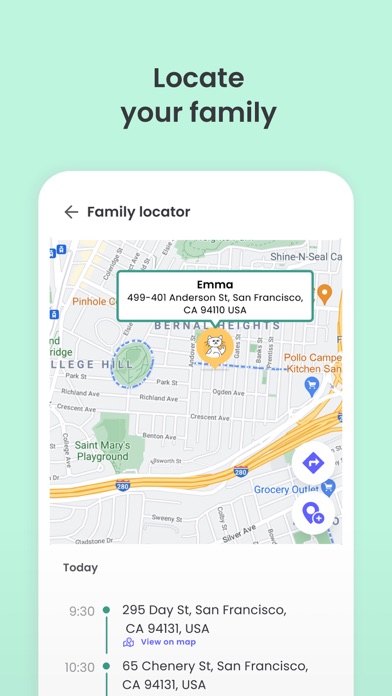
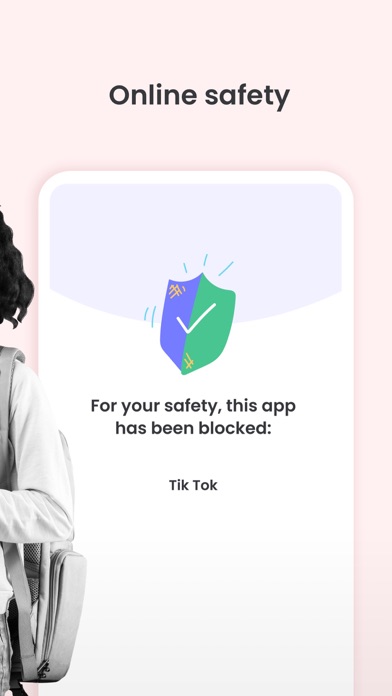
Kids App Qustodio is the companion app to Qustodio Parental Control App. Please only download this app to a device being used by a child or teen. How to get started 1. Download the Qustodio Parental Control App onto your own device (usually your mobile phone or laptop). 2. Then download this Kids App Qustodio onto any of your child’s devices you want to monitor. 3. Together, the two apps allow you to seamlessly manage your child’s daily screen time allowance on linked mobile, tablet, or desktop devices. Features include: • Daily screen time limits set by the Parent App. • Website, search and app usage monitoring on the child’s device. • Website blocking and category blocking (block games, porn, gambling, and lockout unwanted content) on the child’s device • Location tracking of the child's device • Safe search on the child’s device • Unsupported browser blocking on the child’s device • Advanced reporting provided to parents • Real-time alerts sent to parents Kids App Qustodio for iOS and macOS is password protected and cannot be uninstalled from a child’s device without parental permission. If you have any questions or need help, contact us at [email protected] We take privacy and the protection of your family and children’s data extremely seriously. We do not and will not sell data to third-parties. Your child’s screen time activity is for your eyes only. Our Terms of Use are available here: https://www.qustodio.com/family/terms/ Important notes for users - The Kids App Qustodio for iOS install process will ask you to install a special MDM profile and accept special permissions in order to control the internet traffic on the device. This profile can be removed or disabled by you whenever you want. Instructions for installing, uninstalling, and configuring are on our help page. - When connecting to the internet a VPN symbol will appear on the top of the screen. The VPN connection can be disabled temporarily when needed in the Family Portal or by logging into the Kids App Qustodio on your kids' device. - Continued use of GPS running in the background for the Family Locator feature can dramatically decrease battery life.
Screenshots

Reviews

  • Hello,

    3
    By Thisissand🌸Bloxd.io
    Hello, I think this app is meant for ages 7-11. It’s ok but it makes kids have anxiety, it’s makes them think they are different from their friends. I guess it’s good. By a kid named, Thisissand🌸Bloxd.io
  • I COULD NOT DO IT AT ALL ON VACATION

    1
    By Blaze_yt12
    I WAS IN JAPAN AND THE APP DID NOT ADAPT TO THE TIME ZONE AND MY PARENT DID NOT CHANGE IT THE WHOLE 2 WEEKS WERE THERE SO I COULD NOT DO IT AT ALL WHEN I WAS THERE!!!!!!!!!!!!!!!!!!!!!!! Also I deleted it and it is still wasting my data
  • HATE this

    1
    By SassyPrincess123
    These are the moments when I wish I could give a 0 star review. I wouldn’t care about Worst app ever, blocks things randomly that it shouldn’t. It blocks accounts.youtube.com, not YouTube and so I will have to call my parents just to sign in to ANYTHING EVER. Also if I ever was in an emergency but my screen time was up I would not be able to call my parents it should not block FaceTime. Plus when I google an image for inspo or smth that was og posted from TikTok it shows up on parental control as me visiting TikTok which i didn’t. Plus if an ad for like insta or Pinterest pops up boom they text me like WHY ARE YOU ON INSTA? SuperStylist isn’t blocked on it for some reason idk. It’s fine for actual screen time but it’s LITERALLY SCREWING MY IPAD. It completely drains my battery over forty minutes of not using I’m at 70% so all the chargers in the house are constantly in use. At 15 minutes before my screen time ends my internet slows down…..😤😤😤😤And all this isn’t even mentioning HOW SLOW it makes my iPad like cmon guys!
  • BTW YOU CAN REMOVE IT

    1
    By Elemencroc
    If you go to general then vpn and device management it’ll show Qustodio. Click on it and then press remove, WARNING!!!! It sends a warning to your parents phone. But it is easily avoidable if you just swipe away the notification before they see it
  • It’s stupid

    1
    By Note:use it pls it helps you
    When I wanna play one game it cuts off my whole phone so I can’t do anything like text my mom or anybody
  • i hate this

    1
    By andrea..spoorly_7
    terrible app, my child now hates me and isn’t speaking to me. she had this app from 10-18 and i didn’t understand why she was so upset her apps deleted every night. this app is the reason my family has fallen apart.
  • How to remove it (no problem guys)

    1
    By Manthatsomebs
    Go to general snd scroll down till you see VPN & Device Management then click on it you should see Qustodio configuration profile then click it then click remove management then boom (you might get in trouble cus it alerts your parents)
  • worst app ever

    1
    By Lexi.....29
    to start the Screen Time limits I cannot even be on the app for an hour literally for 24 minutes and count it as the hour that I'm supposed to be on it and then no Internet no nothing on my phone. There's so many bugs in this ****, there's no **** privacy whatsoever with this. how much does a normal teenager a normal teenage life if I'm gonna control 24 seven by the stupid app on my phone that won't let me do anything and not to mention it stimulate your request time anymore like when I run the Internet on your app. It's you're out of Internet. You're done like good luck.
  • Worst app ever

    1
    By “The worst”
    It is extremely annoying.It takes away your Wi-Fi and you CAN’T DELETE IT. Honestly, this is more of a virus than an app.
  • Unannounced wifi usage

    1
    By nerdynerve
    Apps good works decently with restrictions but it secretly sucks up all your data. Within 2 weeks of having this installed it used up 55.7GB of my data it’s not worth the amount of wifi/data it uses for the small amount of of restrictions it offers without using a payment plan.

keyboard_arrow_up