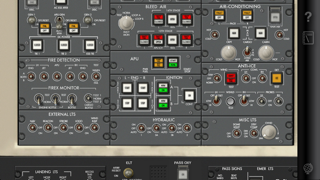
Acron CRJ-200 Cockpit Fam.

Acron CRJ-200 Cockpit Fam.

By Aerosim

  • Category: Education
  • Release Date: 2012-02-03
  • Current Version: 15.18.1
  • Adult Rating: 4+
  • File Size: 27.17 MB
  • Developer: Aerosim
  • Compatibility: Requires iOS 15.6 or later.
Score: 5
5
From 9 Ratings

Description

Master the Bombardier CRJ-200 Cockpit — Your Interactive Learning Tool Step into the cockpit of the Bombardier (MHIRJ) CRJ-200, a widely used regional jet, and explore every display, switch, and panel that makes this aircraft a staple in regional aviation. Acron Aviation CRJ-200 Cockpit Familiarization is an interactive app designed to help you understand the CRJ-200's flight deck, whether you're preparing for a type rating, transitioning to the CRJ-200, or just wanting to familiarize yourself with its panels and controls. The app allows you to explore key cockpit panels such as avionics, fuel management, electrical, and autopilot, offering an intuitive learning experience with detailed, on-demand explanations of every switch and control. Key Features: • Interactive Cockpit Exploration: Tap on any button, switch, or display to view detailed descriptions and learn about its role in the aircraft’s operations. • Authentic, High-Resolution Cockpit Imagery: Explore realistic, high-quality graphics of the CRJ-200 cockpit, designed for easy interaction and navigation, replicating the real flight deck. • Ideal for Pilot Training: Designed for pilots preparing for a CRJ-200 type rating, transitioning to the CRJ series, or aviation students seeking to learn about regional jet flight decks for transitioning from piston aircraft. • Capture Notes: Add custom notes to any component for personalized, quick reference. • Offline Accessibility: Study the cockpit and systems anytime, anywhere — no internet connection required once the app is downloaded. Why Choose Acron Aviation CRJ-200? • Designed by pilot training technology expert Acron Aviation, with access to officially licensed aircraft cockpit data. • Familiarize yourself with the CRJ-200’s cockpit layout and systems before your simulator or flight training sessions. • Save time and increase confidence by reinforcing your knowledge of most aircraft system controls including Autoflight, Fuel, and Flight Management among others. • Perfect for pilots upgrading to the CRJ series, aviation students, or anyone interested in mastering the system controls of a regional jet. • Enhance your cockpit understanding with intuitive, on-demand learning that prepares you for real-world practice. Prepare for the CRJ-200 flight deck before your first flight or simulator session. Tap, learn, and master every system interactively — on your schedule. Download Acron Aviation CRJ-200 Cockpit Familiarization and start mastering the Bombardier (MHIRJ) CRJ-200 flight deck today! Note: The aircraft manufacturer offers differing cockpit configurations, layouts, and/or options to their customers. The graphics and related descriptions used in this application represent a specific configuration and may not exactly correspond to your respective aircraft. For customization for your organization, please reach out to an Acron Aviation Sales member for more information.

Screenshots

Reviews

  • Not Accurate.. Missing Crucial Equipment.

    3
    By EagleEz762rj
    Though fairly realistic, where is the CARGO Fidex Fire control ? It’s not in the lower pedestal as the 200’s have…
  • Stopped working

    1
    By Shellyjmontgomery
    None of the buttons work if I click on them, and the website is down when I try to contact the developer.
  • Do not buy this app

    1
    By magic market mike
    I downloaded this app not expecting perfection but at least some functionality and was surprised to find no relevant functionality at all. Buyer beware.
  • Quit working

    1
    By Pickin my nose for you
    I have this app. Not cheap. It no longer works. Can’t get it to do anything other than a picture of the flight deck panel.
  • APU LCV

    3
    By crorlo
    APU LCV light switch is incorrect.
  • Worthless

    1
    By Polywaga
    I purchased this believing it would be a mobile version of Aerosim's interactive VFD. In fact it is not interactive at all. This app does not include checklists or flow patterns and you can not see the results of pushing any of the buttons. Its essentially a $30 picture of a CRJ cockpit.
  • A great app

    5
    By Ed12p
    I purchased this to help study for recurrent training and I am very pleased. The app works well and looks great. The ability to add your own notes to any switch or button is a terrific feature and allows you to add company restrictions, mnemonic devices, etc. Overall I'm very pleased and I highly recommend this to any 200 driver.
  • Has its uses but could use some work

    3
    By Stygian42
    It's a work in progress as I see it. While this app does seem to have accurate information from what I have explored. There could be some more useful functionality added to this with ease. For starters they have a notepad that allows you to add notes to switches then highlights them blue so you can click on them and read the notes. This is a nice function for making notes about switches and buttons. With a little extra coding I'm sure though they could make it so much more. If they could let your create multiple notepads and store them on the side it would effectively let you create flows to study based on how your company flys. A little more coding and I'm sure you could have it remember the order in which you pressed the button (similar to how a key logger works) so that it could play the button selection order back to you as a flow using the same highlighting it already has (think of the game "Simon"). As far as the other commenter that complained about this having no flows he is right but this app does not deserve a 1 star for that. This is a check ride prep supplement not a flow trainer as it currently is. The information is fairly basic but does help with overall cockpit awareness and with the correct airline training manuals you can makes this a nice supplement to your training.
  • Worthless

    1
    By Sthapa
    I am taking CRM class and I thought this would be helpful apps. I would not recommend any one to purchase this apps. All it does is explain about the switches and buttons and it doesn't even have flows. I wouldn't spend 32 bucks for this crap.
  • Still a horrible app, total ripoff

    1
    By Motoflyer
    This app is not worth a dollar, let alone what they want for it. Full of incorrect information; the information that is correct is very vague. You cannot view the full EICAS pages because the app defaults to portrait view and cut off half the page, even if you have the iPad turned for landscape. If you prepared for a checkride using the information provided here you'd be sure to fail. I've emailed the developer but complaints go unanswered. Don't waste your money!

keyboard_arrow_up