Roland Cloud Connect

Roland Cloud Connect

By Roland Corporation

  • Category: Music
  • Release Date: 2021-11-16
  • Current Version: 1.7.0
  • Adult Rating: 4+
  • File Size: 27.50 MB
  • Developer: Roland Corporation
  • Compatibility: Requires iOS 12.0 or later.
Score: 3.15385
3.15385
From 13 Ratings

Description

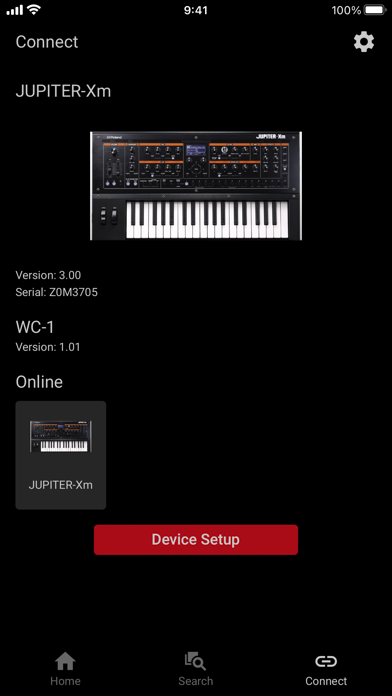
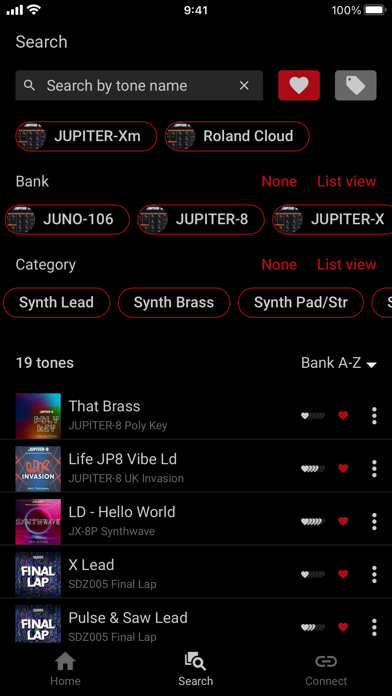
The Roland Cloud Connect app lets you explore tones on your JUPITER-X, JUPITER-Xm, JUNO-X, GAIA 2, GO:KEYS 3, GO:KEYS 3 IN or GO:KEYS 5 using the Roland WC-1 Wireless Adapter. Or you can install Instrument Expansions on the Wi-Fi-equipped V-Drums V71, V51 or V31. The app also lets you subscribe to Roland Cloud's premium memberships and install additional Model Expansions, Sound Packs, Wave Expansions, World Expansions, Instrument Expansions, and Kit Packs to these products. With the Roland Cloud Connect app, you can search, preview, and load tones from the thousands of sounds on Roland Cloud into your JUPITER-X, JUPITER-Xm, JUNO-X, GAIA 2, GO:KEYS 3, GO:KEYS 3 IN, or GO:KEYS 5. You can even browse and load additional Style Packs for the GO:KEYS 3 and 5 models, and Drum Kits for the V-Drums V71, V51 and V31. To use this app, you will need a WC-1 Wireless Adapter with a compatible instrument model (i.e., JUPITER-X, JUPITER-Xm, JUNO-X, GAIA 2, GO:KEYS 3, GO:KEYS 3 IN, or GO:KEYS 5). If you use V-Drums V71, V51 or V31, you do not need a WC-1 as it has built-in Wi-Fi capability. You will also need a registered Roland Account and an internet connection. Applicable models: - JUPITER-X/JUPITER-Xm (Ver.2.00 or later) - JUNO-X (Ver.1.10 or later) - GAIA 2 (Ver.1.10 or later) - GO:KEYS 3/GO:KEYS 5 (Ver.1.04 or later) - GO:KEYS 3 IN (Ver.1.01 or later) - V71 (Ver.1.10 or later) - V51 (Ver.1.02 or later) - V31 (Ver.1.02 or later) * Any communication expenses (packet communication fees, etc.) incurred while using this software will be charged to customers. * This software might not be available depending on your country or region. * In the interest of product improvement, the specifications and/or appearance of this software are subject to change without prior notice.

Screenshots

Reviews

  • Landscape Mode

    3
    By WB5937642
    Really the most common way to use an iPad
  • Awesome App, love with my Juno-x

    5
    By Awesttruck
    Works amazing with my Juno-X. Love how I can install model expansions and load presets instantly without having to search.
  • When will Fantom/Fantom 0 get support?

    2
    By JBChristian
    I find it strange that this works with the new low-end Go:Keys keyboards but STILL doesn’t work with the flagship Fantom Workstations! I think Roland has its priorities out of whack. I’m sitting here, ready to spend the money for the wireless dongle that works with this app, as soon as they get it working with the Fantom, but nope. I don’t get what they are thinking.
  • 👎🏻

    1
    By htdddyygjkjhfsryhjojnkjcxs
    This app is trash never works
  • Make this landscape

    2
    By abdielyireh
    This app need to be made on landscape mode urgently. Basically 99% of all of the iPads stands are for landscape. Having this in portrait makes it almost impossible to work with.
  • Fantom 0 series?

    2
    By LatenAgain546
    Will this ever support the Fantom 0 series so that I don’t have to use a laptop?
  • Update - Now a 5 star app and service

    5
    By mechascorpio
    I don’t seem to be able to update my previous March 2022 review (4 out of 5 stars), so I’m going to add this. Recent updates have taken it beyond a “promising start” and to a mature, 5 star app and service. Glad to see it expanding to the JUNO-X crowd, who will find it an excellent deal and tool. This (with WC-1) is an essential addition to anyone with a JUPITER X or Xm, or the new JUNO.
  • No mention of Juno-X support?!!

    1
    By Pookie Pants Stank
    I am afraid I’m quite confused. What the new Juno-X and a WC1 dongle, because all of the Juno-X presentation videos on YouTube say it works. But there is no mention of it in this app! Did I just waste $100 USD on the WC1?

keyboard_arrow_up