Evernote - Notes Organizer

Evernote - Notes Organizer

By Evernote Corporation

  • Category: Productivity
  • Release Date: 2019-02-12
  • Current Version: 11.20.2
  • Adult Rating: 4+
  • File Size: 230.94 MB
  • Developer: Evernote Corporation
  • Compatibility: Requires iOS 15.1 or later.
Score: 4.40958
4.40958
From 75,463 Ratings

Description

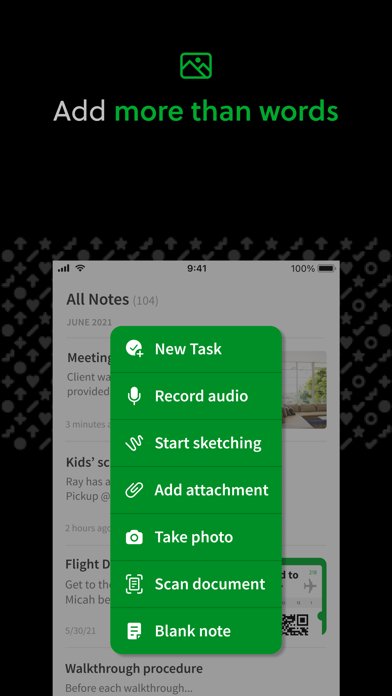
Capture ideas when inspiration strikes. Bring your notes, to-dos, and schedule together to tame life’s distractions and accomplish more—at work, at home, and everywhere in between. Evernote syncs to all your devices, so you can stay productive on the go. Tackle your to-do list with Tasks, connect your Google Calendar to stay on top of your schedule, and see your most relevant information quickly with a customizable Home dashboard. --- “Use Evernote as the place you put everything… Don’t ask yourself which device it’s on—it’s in Evernote” – The New York Times “When it comes to taking all manner of notes and getting work done, Evernote is an indispensable tool.” – PC Mag --- CAPTURE IDEAS • Write, collect, and capture ideas as searchable notes, notebooks, and to-do lists. • Clip interesting articles and web pages to read or use later. • Add different types of content to your notes: text, docs, PDFs, sketches, photos, audio, web clippings, and more. • Use your camera to scan and organize paper documents, business cards, whiteboards, and handwritten notes. GET ORGANIZED • Manage your to-do list with Tasks—set due dates and reminders, so you never miss a deadline. • Connect Evernote and Google Calendar to bring your schedule and your notes together. • See your most relevant information instantly on the Home dashboard. • Create separate notebooks to organize receipts, bills, and invoices. • Find anything fast—Evernote's powerful search can even find text in images and handwritten notes. ACCESS ANYWHERE • Sync your notes and notebooks automatically across any computer, phone, or tablet. • Start work on one device and continue on another without missing a beat. EVERNOTE IN EVERYDAY LIFE • Keep a journal to keep your thoughts organized. • Go paperless by scanning receipts and important documents. EVERNOTE IN BUSINESS • Keep everyone up to date by capturing meeting notes and sharing notebooks with your team. • Bring people, projects, and ideas together with shared Spaces. EVERNOTE IN EDUCATION • Keep track of lecture notes, exams, and assignments so you don’t miss important details. • Create notebooks for each class and keep everything organized. --- Privacy Policy: https://evernote.com/legal/privacy.php Terms of Service: https://evernote.com/legal/tos.php Commercial terms: https://evernote.com/legal/commercial-terms

Screenshots

Reviews

  • No Customer Support for Paid Users

    1
    By admiralu
    NO CUSTOMER SUPPORT Haven’t been able to use a desktop or web version for over a year. Can’t contact support because the desktop app never works. Emails are ignored and new company just keeps shoving more AI garbage in the app. Price hike is ridiculous and I will be moving to another service. I don’t mind paying for a good product, but Bending Spoons has ruined what used to be a great service.
  • Evernote

    4
    By profmiket
    The insistence that I write and submit a review is an annoying change. That’s never been true before. I’ve downgraded my rating because of that.
  • Dark Design

    1
    By Chris Ricca
    The dark design patterns on the ever present upgrade popups are terrible.
  • Beware

    1
    By Bryan0118999
    They deleted my info without giving me chance to do anything about it. It’s all gone
  • Still Using Evernote

    5
    By GeoSinam
    Happily “entangled” on Evernote via multiple devices, calendar and tasks. Given the volume of detailed notes is 300+, the “in-app-AI” functionality of summarizing from my internal content has been really useful. Yes… you pay for this.
  • Change is not always for the better

    1
    By Geyerman Family Shared
    I’ve been using Evernote since around 2010. It’s had improvements over the years. Been bought and sold by different owners. Changes made. Price has gone up as has the price for everything else. Features come. Features go. This year the price went from $150 a year to $260 a year. This for a bunch of features that were already deployed for the most part and that I hadn’t used quite frankly. Obviously, I’m invested in the technology since I’ve used it for 16 years. Not anxious to have to move everything to some other platform. One of the most annoying things recently is that EVERY time I open the app it pops up a request for me to submit a review. This happens right as I am locating the note that I need to retrieve information from or in the middle of a dictating a new note. It’s incredibly annoying. Really makes me wonder if the people who develop these software tools actually use them personally.
  • Best Way to Organize Ideas and Information!

    5
    By CaptainAHook
    I do not know how I would survive without this app. I’m a homeschooler, researcher, textile artist and instructor but spent about 30 years climbing the HR and Operations. Part of that time was also consulting in business launches, PR and career pivots. Needless to say, I gather a lot of information and being able to keep tags helps me organize all my thoughts, articles, and project notes. By tagging my notes and such, I get the information I need and usually related information which enriches all of my projects and lessons. It’s a great app and worth every penny.
  • Continued Price Hikes

    1
    By MikeIsFineEnough
    Glitchy service at a RIDUCLOUS cost! This used to be such a good app. Terrible now.
  • Money Grubbing

    1
    By ....k...
    Already a paying customer. Every time I modify a note it sends pop-ups asking for more expensive subscription. Super annoying and not needed since my current account has everything I need.
  • Support is horrible

    1
    By KRyan88
    Support is horrible

keyboard_arrow_up