Brother P-touch Editor

Brother P-touch Editor

By Brother Industries, LTD.

  • Category: Lifestyle
  • Release Date: 2019-08-05
  • Current Version: 5.3.23
  • Adult Rating: 4+
  • File Size: 98.87 MB
  • Developer: Brother Industries, LTD.
  • Compatibility: Requires iOS 13.0 or later.

Description

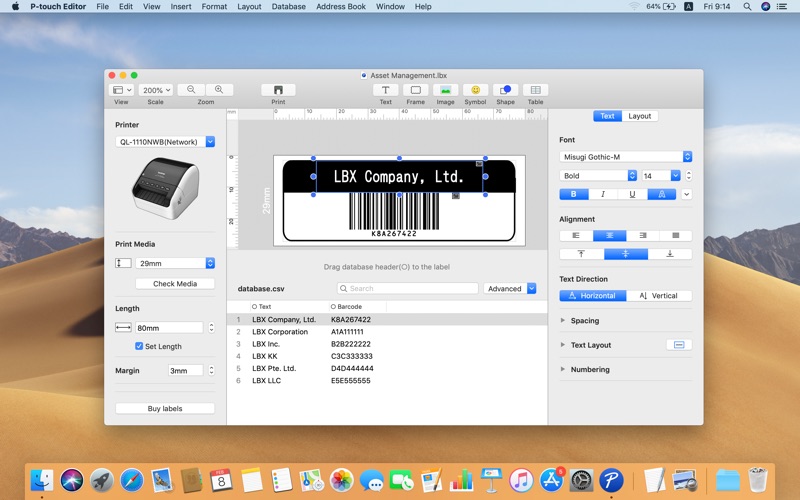
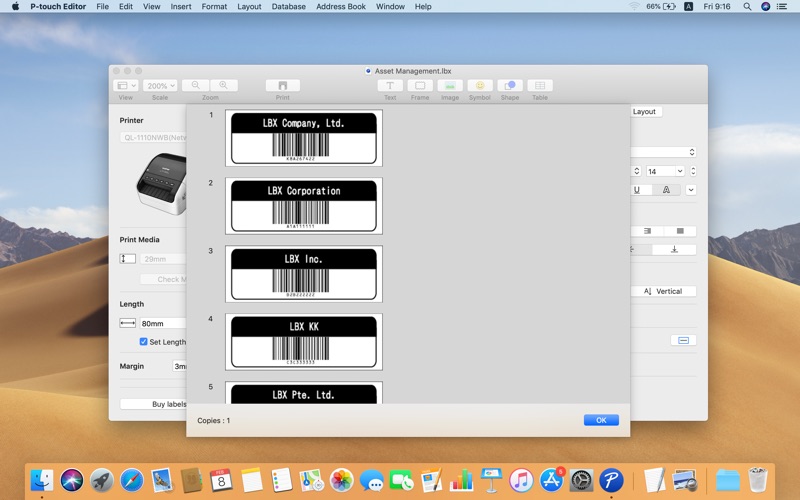
P-touch Editor for Mac is a free app for Brother label and mobile printers. It allows you to design and print custom labels using built-in drawing tools to create various font and text styles, import images, and insert barcodes. Compatible models (P-touch Editor Ver.5.3.20) QL-1100, QL-1110NWB QL-1050, QL-1060N QL-800, QL-810W, QL-820NWB QL-700, QL-710W, QL-720NW QL-600, QL-650TD QL-500, QL-550, QL-560, QL-570, QL-580N PT-9500PC, PT-9700PC, PT-9800PCN PT-P900W, PT-P910BT, PT-P950NW, PT-D800W, PT-E800W PT-P700, PT-P710BT, PT-715eBT, PT-P750W PT-D600, PT-D610BT, PT-E500, PT-H500, PT-E550W PT-D410, PT-D450, PT-D460BT PJ-822, PJ-823, PJ-862, PJ-863, PJ-883 VC-500W PT-E310BT, PT-E560BT For more information about the model compatibility with versions earlier than 5.2.5, please refer to the following URL. https://support.brother.com/g/s/es/os/macintosh.html

Screenshots

Reviews

  • Doesn’t Print – Disappointing Experience with No Resolution

    1
    By Sendy559
    I purchased the Brother QL-700 label printer expecting a reliable, plug-and-play device, but unfortunately it has been nothing but frustrating. The printer powers on (green light), but it will not feed or print labels at all. I replaced the power cord, checked the label roll, and followed all setup instructions carefully. Despite that, the machine still doesn’t function. I even contacted Brother customer support, and they were unable to resolve the issue. For something marketed as easy to use, this has been the opposite. It’s essentially unusable in its current state, which is unacceptable for a basic function like printing labels. Extremely dissatisfied and would not recommend based on this experience.
  • Great Labels

    4
    By Radiogla
    Excellent performance, high quality labels. Software is somewhat cumbersome to use
  • P Touch printer

    5
    By P Touch
    I love this little label printer!
  • Excellent Machine

    5
    By ExGManBoston
    I’ve had this label printer for years. It works great and has been completely reliable. An excellent investment!
  • QR codes from MAC address book - NOT!

    3
    By PlayerDead
    QR codes cannot automatically generate from MAC address entries. The labels can, Just not a QR code entry within the label itself. Please fix this brother.
  • Works Like a Gem

    5
    By jej's tunes & videos
    The P-Touch works like a gem, with my Mac or solo.
  • QL-700 Printer is excellent

    5
    By RiverRat37
    I have had this Brother label printer (mine on Apple MAC) for years and not used it. Today was the day to overcome this. So pleased that I did. Getting it running was mostly straight forward so I had it up and functional quickly. It’s neat! Lots of label designs to choose from and endless fonts for the actual label text. I have found no fault with it yet and don’t expect to. Very happy camper, but only ashamed that I did not do this sooner.
  • QR code Functionality Unusable

    1
    By Azenzic
    The program is supposed to make QR codes but if you choose anything but ‘Auto” QR code version it will just keep making the QR code bigger each time you print. this makes Data base printing impossible and requires you to make the QR code version one smaller than you want an pray it comes out like you want. Sure Auto works but only when the data is the same size and style but I want all my QR codes to be the same size at QR code version 7 but I can’t do that I need to make them all QR code version 6 and print them off one by one and with each bring the program then upscales the QR code to version 7. this can also be observed if you unclick “auto” and just rotate the QR code with the Layout settings.
  • Incredibly easy to use!!

    5
    By leilahlunaa
    I’m surprised at how quickly I was able to insert my own images as symbols/pictographs and print them on labels!! 100% recommend
  • No templates on mac

    2
    By Animapper
    Why are the templlates for wiring etc. only available for the Windows side? I use both but it's a hassle to not make them available. As a developer I don't get Brother's lack of care here.

keyboard_arrow_up