Google TV: Watch Movies & TV

Google TV: Watch Movies & TV

By Google

  • Category: Entertainment
  • Release Date: 2014-01-15
  • Current Version: 3.31.00001
  • Adult Rating: 12+
  • File Size: 78.82 MB
  • Developer: Google
  • Compatibility: Requires iOS 17.0 or later.
Score: 4.32646
4.32646
From 4,803 Ratings

Description

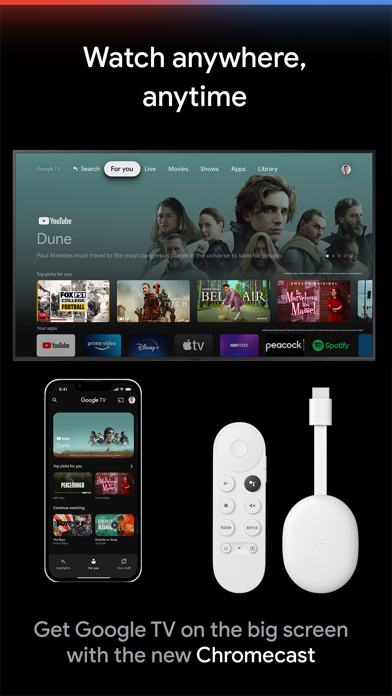
The Google TV app, previously Play Movies & TV, makes it easy to find and enjoy the entertainment you love from across your apps, all in one place. With Google TV, you'll be able to: Find what to watch next Browse movies and TV episodes from across your streaming apps, all in one place and organized into topics and genres. Discover new things with recommendations based on what you love and what’s trending across the services you already have access to. Search for titles to see which apps are streaming them. Create a list for all your discoveries Add interesting shows and movies to your Watchlist to keep track of your new discoveries and view them later. The Watchlist is shared across your devices, so you can even add to your Watchlist from your TV or phone and laptop through Search on any browser. Take your favorites on-the-go Your recommendations, Library and Watchlist go with you wherever you go, whether it is out the front door or just to the other room. Start streaming right on your mobile device, or download your previously purchased entertainment from your Library to watch when you're not connected. Use your phone as your Google TV / Android TV remote With a remote built right into the app, you can find something great to watch even when the couch has eaten your remote. And you can use your phone’s keyboard to quickly type complicated passwords, movie names or search terms on your Google TV or other Android TV OS device Learn more about Google TV: https://tv.google

Screenshots

Reviews

  • Digital remote barely works

    3
    By Andre "thebigboidre" walker
    Why do I have to keep closing the app 5 times just to get the remote on the app to work? Like what’s the point anymore?
  • Horrible Pairing

    1
    By BoriLowKey
    It was great the first few seconds, then it just kicks you off of it in the middle of you using it, making you have to repair it 1000xs before being able to pick a movie/ show and press play. Very annoying. But when you lost your remote Beggars CANT BE CHOOSERS HUH!?
  • Glitching

    1
    By Scaly python
    It keeps not wanting to play movies I want to watch!
  • DOES NOT HAVE THE REMOTE FUNCTION.

    1
    By karate679
    this is absolute garbage. it doesn’t work. i can’t find my remote and i need to shut off my tv and i can’t because i don’t have my remote so i downloaded this, YES i have a google tv. it just says only purchased contact can be cast on this device. what in the world does that even mean ? no code even shows on my tv. yes it’s the same network. yes my bluetooth is on. yes it says it connected to the tv. NO REMOTE SHOWS. Only tells me to stream a show , but only purchased. there is NO FIX. NO REMOTE SHOWS ON MY PHONE . Oi looked it up and that isn’t even an issue that’s been dealt with by anyone else before. apparently no one else has this problem. this app does not contain the remote it says it does. i have to download a random app and pay a monthly fee to get one. ridiculous.
  • I’ve got some issues

    3
    By Carter Q
    While it’s amazing to be able to just grab my phone whenever I can’t find the remote to my Hisense TV, there’s a couple issues that are cramping my style. Picture this: you are trapped in a house with an energetic toddler who loves very, very long YouTube videos. Perhaps someday, YouTube will offer a “play from beginning” button. But that glorious day is not today. So you are resigned to spamming the back arrow on the Google TV app like you are speed-running an arthritis diagnosis. I am BEGGING you to please adjust the sensitivity on the rewind function of the back arrow. The rate of speed you have to tap in order to accelerate the rewind speed is so absurd that I didn’t even know the app had this functionality for a very long time! This isn’t a Smash Bros tournament, and I fear the friction of button spamming will overheat my phone if my fingers don’t fall off first. Seriously, I challenge anyone reading this to get 80% through a multi-hour-long YouTube video (may I suggest Jenny Nicholson?) and then try to rewind it as fast as you can. The other issue I am experiencing (and what pushed me over the edge to writing this): lately if I am playing audio on my phone at a low volume and I allow it to continue playing while I swipe over to this app to use the remote, my phone’s volume will skyrocket to like 95%, and it’s horrible. TV volume remains unchanged. New migraine unlocked. I hope this will get fixed soon please, sending all my love to Google’s support and dev teams, thank you so much! 💖
  • Worst remote

    1
    By vrygudgrl
    This is awful. I can't control my tv with my phone. Our remote fell off of our couch onto our floor and now doesn't work. So I can't use the remote for the tv and the remote with my phone sucks. I can only turn the tv on. Can't select anything or watch anything. Google tv is awful. I hate our tv!
  • Move "Continue Watching"

    1
    By Jason & Kori Family
    I don't mind it promoting other shows but that shouldn't move the stuff I am watching so far down it isn't worth finding
  • Garbage Unreliable App

    1
    By Schnarfschnarf
    EDIT: The app actually isn't losing connection cause I see that it shows being connected to my google tv. Instead the app just arbitrarily decides that I don't need the remote as I'm actively using it and just causes it to disappear. I can't use the remote feature for more than 15 seconds without it disappearing on me and having cycle through disconnect and reconnect and force close and opening etc to get the remote back. Truly terrible app. Can't reliably do the one thing I need it to. I connect to my tv, then it drops connection as I'm using the remote. I then choose my tv to reconnect and it just loads forever. Getting a google tv had already proven to be a mistake, and the fact that their app can't even function properly as a remote, is just the cherry on top. Should have stuck with Roku. Learned my lesson. In fact, I would be using my Roku plugged into this tv except the tv also doesn't accept the Roku despite it working on other tvs.
  • Suggestions

    5
    By Josephusbrooks
    They should put this app on Apple TV and have it where people can buy movies and tv shows on here to and Roku too
  • Stop the idiotic repeated reminders about turning on Bluetooth

    1
    By zethuz
    It’s off intentionally. Don’t need these annoying pop ups every day. Wish Google had some common sense

keyboard_arrow_up